 Crypto & secrets lab
Keysmith
Audit certificates, keys, TLS and passwords in one lab; secrets stay on your device.
Keysmith is a crypto and secrets lab that turns fourteen usefulweb.site security tools into one workspace. Collect certificates, public keys, TLS configurations, checksums, password policies, KDF settings, decoding recipes, secret-sharing plans and passkey responses in a project, run them all, and get one dashboard of findings with an expiry timeline, calendar reminders, A/B comparisons and a printable report. Hashes, HMACs, PBKDF2, HKDF, file encryption, password generation, Shamir splitting and breach checks run in your browser; anything that needs the server asks first.

Screenshots
- Findings dashboard with expiry timeline
 Workbench: one item, its tool run and findings
 TLS scenario A/B, client by client
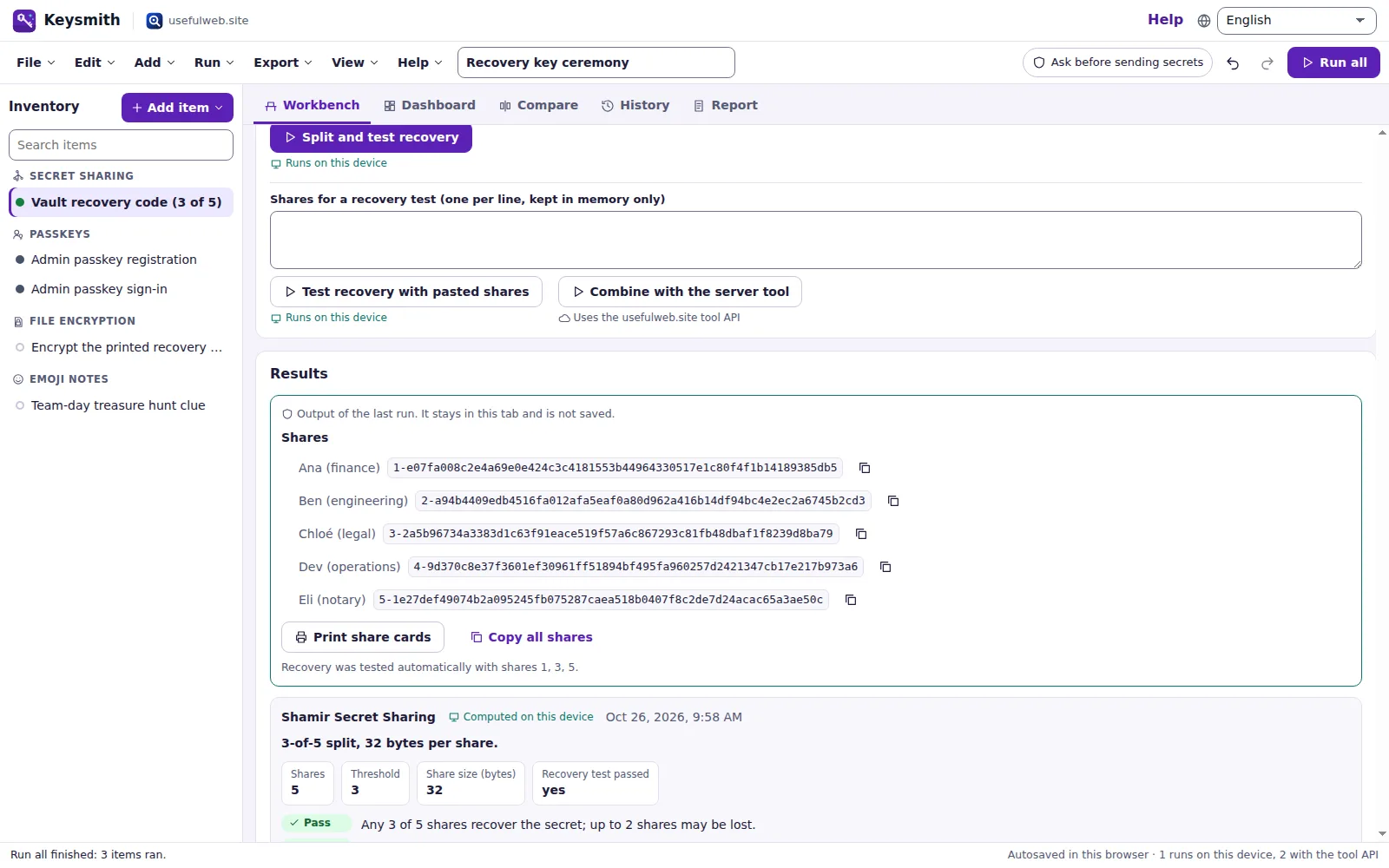 Secret-sharing ceremony with custodians
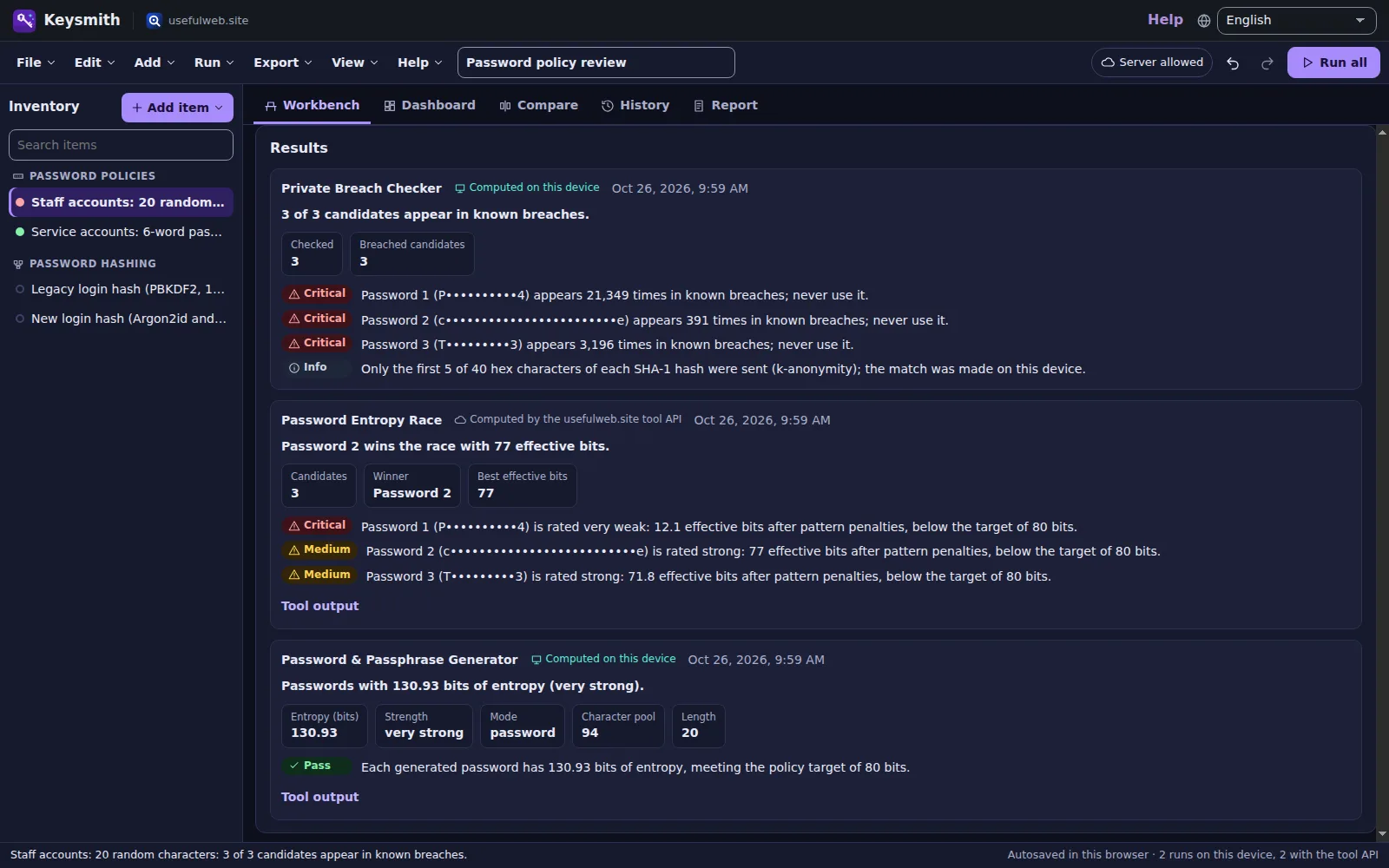 Password policy lab in the dark theme
 Consolidated report, ready to print
Features
One security inventory
Certificates and chains, public keys (PEM, JWK, OpenSSH), TLS profiles, checksums, password policies, KDF settings, recipes, secret-sharing plans, passkeys and encryption jobs in one project with owners and review dates.
Fourteen tools, one workbench
Every item runs the matching usefulweb.site tool: X.509 and key inspectors, TLS simulator, hash/HMAC, KDF lab, password generator, entropy race, breach check, Shamir, passkey tester, Crypto Kitchen, CyberChef-lite, file encryption and emoji ciphers.
Secrets stay local
SHA-1/2 hashes, HMAC, PBKDF2, HKDF, AES-256-GCM files, random passwords and Shamir splits are computed in your browser with Web Crypto; breach checks send only five characters of a SHA-1 hash. Server runs that would receive a secret ask first or are blocked.
Findings dashboard
All results become severity-ranked findings — expired or weak certificates, deprecated TLS, failed checksums, breached passwords, weak KDF settings — with counts, filters and a jump to the item.
Expiry timeline & reminders
Certificate expiry dates, key rotation and recovery-drill dates on one timeline, exported as an .ics calendar with alarms before each deadline.
Key ↔ certificate pairing
Keysmith compares SPKI fingerprints and tells you which public key belongs to which certificate — useful before a renewal or an HSM swap.
Scenario A/B
Compare two TLS profiles client by client (who gains, who is locked out, what changes) or any two items or runs of the same kind side by side.
Changes over time
Every run is kept with its findings; the history shows new and resolved findings and changed metrics between runs, so you see what a renewal or config change fixed.
Batch runs
Run a decoding recipe over many log lines with progress and a CSV of results, or verify a whole sha256sum manifest against local files without uploading them.
Password policy lab
Generate under a policy with an entropy target, race real-looking candidates against pattern penalties and check them against known breaches in one place.
Secret-sharing ceremonies
Split a recovery code k-of-n in the browser, name custodians, print one share card per person, test the recovery with any k shares and schedule the next drill.
Consolidated report
A printable report (PDF via print) with the findings, the inventory, the timeline and where each result was computed, plus CSV, JSON, SVG and PNG exports.
Projects that travel
Autosave and recent projects in your browser, project files, share links, undo/redo, six templates and Google Drive saving — secret test values are left out unless you opt in per item.
API, MCP & App Bridge
Every tool is available through the JSON API and MCP on the app host; findings and reports go to other premium apps, and text, PDFs and images from them can be hashed or encrypted here.
Templates
Start from a ready-made project and change it to fit.
Web shop TLS & certificate audit
Three certificates (one chain, one expiring soon, one legacy self-signed), the matching public key and the current vs. proposed TLS configuration as an A/B scenario.
SSH & API key inventory
Deploy and backup SSH keys, a JWK token-signing key, an RSA API key and a retired certificate with review dates and calendar reminders.
Password policy review
Random-password and passphrase policies with an entropy target, a race between typical candidates, a breach check and legacy vs. OWASP password hashing.
Release integrity & webhook signatures
Verify a published SHA-256 checksum, catch a tampered copy, check a webhook HMAC signature and decode and verify a JWT.
Recovery key ceremony
A 3-of-5 secret-sharing plan with named custodians and a recovery drill date, passkey registration and sign-in checks, a file encryption job and a fun emoji note.
Token & payload forensics
Batch-decode doubly URL-encoded log lines, unpack a gzip+Base64 payload, hex-dump a header and decode an emoji message.
Built-in tools
Keysmith uses these tools. Each one also has its own page and works on its own, in the browser, through the JSON API and through MCP.
- X.509 / ASN.1 Certificate InspectorDecode X.509 certificates, chains and CSRs: SANs, usages, CT SCTs, chain order and an ASN.1 tree.
- RSA/ECC Key InspectorInspect PEM, DER, JWK or OpenSSH keys: type, size, curve, fingerprints, thumbprint and weaknesses.
- TLS Cipher-Suite SimulatorSee which TLS version, cipher and group browsers, Android, Java and OpenSSL get from your server.
- Hash & HMAC CalculatorMD5, SHA-2, SHA-3, BLAKE2, CRC32 and HMAC of text or files, with checksum compare.
- Password & Passphrase GeneratorStrong random passwords and passphrases, made in your browser, with exact entropy.
- Password Entropy RaceRace 2–6 passwords or passphrases: entropy, pattern penalties and crack times.
- Private Breach CheckerCheck if a password appears in known breaches without revealing it (k-anonymity).
- Key Derivation LabDerive keys with PBKDF2, scrypt, Argon2id and HKDF; compare costs with OWASP advice.
- Crypto KitchenCyberChef-style recipes: chain encodings, compression, hashes, AES, JWT and more, step by step.
- CyberChef-lite PipelineOne-click decoding recipes: JWT, base64 → gunzip → JSON, double URL decode, hex dump.
- Shamir Secret SharingSplit a secret into n shares so any k recover it, and combine shares, locally.
- Passkey & WebAuthn TesterTest passkeys in your browser and decode WebAuthn responses: flags, AAGUID, signatures.
- Local File Encryption StudioEncrypt and decrypt files with AES-256-GCM and a password, locally in your browser.
- Emoji Cipher PlaygroundTurn secret notes into emoji and back: substitution, Caesar shift and base-emoji.
For AI agents
Keysmith runs on a deterministic engine. The same functions are available as tools with a JSON API and MCP, so scripts and AI agents get exactly the results the app shows.
- X.509 / ASN.1 Certificate Inspector – Decode X.509 certificates, chains and CSRs: SANs, usages, CT SCTs, chain order and an ASN.1 tree.
Tool page ·POST https://keysmith.usefulweb.site/api/v1/tools/x509-certificate-inspector/calculate· MCPx509_certificate_inspector - RSA/ECC Key Inspector – Inspect PEM, DER, JWK or OpenSSH keys: type, size, curve, fingerprints, thumbprint and weaknesses.
Tool page ·POST https://keysmith.usefulweb.site/api/v1/tools/rsa-ecc-key-inspector/calculate· MCPrsa_ecc_key_inspector - TLS Cipher-Suite Simulator – See which TLS version, cipher and group browsers, Android, Java and OpenSSL get from your server.
Tool page ·POST https://keysmith.usefulweb.site/api/v1/tools/tls-cipher-suite-simulator/calculate· MCPtls_cipher_suite_simulator - Hash & HMAC Calculator – MD5, SHA-2, SHA-3, BLAKE2, CRC32 and HMAC of text or files, with checksum compare.
Tool page ·POST https://keysmith.usefulweb.site/api/v1/tools/hash-hmac-calculator/calculate· MCPhash_hmac_calculator - Password & Passphrase Generator – Strong random passwords and passphrases, made in your browser, with exact entropy.
Tool page ·POST https://keysmith.usefulweb.site/api/v1/tools/password-generator/calculate· MCPpassword_generator - Password Entropy Race – Race 2–6 passwords or passphrases: entropy, pattern penalties and crack times.
Tool page ·POST https://keysmith.usefulweb.site/api/v1/tools/password-entropy-race/calculate· MCPpassword_entropy_race - Private Breach Checker – Check if a password appears in known breaches without revealing it (k-anonymity).
Tool page ·POST https://keysmith.usefulweb.site/api/v1/tools/private-breach-checker/calculate· MCPprivate_breach_checker - Key Derivation Lab – Derive keys with PBKDF2, scrypt, Argon2id and HKDF; compare costs with OWASP advice.
Tool page ·POST https://keysmith.usefulweb.site/api/v1/tools/key-derivation-lab/calculate· MCPkey_derivation_lab - Crypto Kitchen – CyberChef-style recipes: chain encodings, compression, hashes, AES, JWT and more, step by step.
Tool page ·POST https://keysmith.usefulweb.site/api/v1/tools/crypto-kitchen/calculate· MCPcrypto_kitchen - CyberChef-lite Pipeline – One-click decoding recipes: JWT, base64 → gunzip → JSON, double URL decode, hex dump.
Tool page ·POST https://keysmith.usefulweb.site/api/v1/tools/cyberchef-lite-pipeline/calculate· MCPcyberchef_lite_pipeline - Shamir Secret Sharing – Split a secret into n shares so any k recover it, and combine shares, locally.
Tool page ·POST https://keysmith.usefulweb.site/api/v1/tools/shamir-secret-sharing/calculate· MCPshamir_secret_sharing - Passkey & WebAuthn Tester – Test passkeys in your browser and decode WebAuthn responses: flags, AAGUID, signatures.
Tool page ·POST https://keysmith.usefulweb.site/api/v1/tools/passkey-webauthn-tester/calculate· MCPpasskey_webauthn_tester - Local File Encryption Studio – Encrypt and decrypt files with AES-256-GCM and a password, locally in your browser.
Tool page ·POST https://keysmith.usefulweb.site/api/v1/tools/file-encryption-studio/calculate· MCPfile_encryption_studio - Emoji Cipher Playground – Turn secret notes into emoji and back: substitution, Caesar shift and base-emoji.
Tool page ·POST https://keysmith.usefulweb.site/api/v1/tools/emoji-cipher-playground/calculate· MCPemoji_cipher_playground
- MCP endpoint (Streamable HTTP):
https://keysmith.usefulweb.site/mcp - Project file format (JSON Schema): https://keysmith.usefulweb.site/project.schema.json
- OpenAPI description: /openapi.json · llms.txt · API & MCP
Build a project through the API, then open it in the app with a link to https://keysmith.usefulweb.site/app#project=<base64url JSON>.
Import & export
Import
- Keysmith project (.keysmith.json)
- PEM certificates, chains and public keys
- JWK and OpenSSH public keys
- sha256sum / shasum manifests
- Any file to hash or encrypt (stays local)
- UWFE encrypted files (.uwenc)
- Project link (#project=…)
Export
- Keysmith project (.keysmith.json)
- Findings CSV
- Inventory CSV
- Batch results CSV
- Reminders calendar (.ics)
- Timeline and severity charts (SVG, PNG)
- Printable report (PDF via print)
- Findings JSON
- Encrypted files (.uwenc)
- Share cards (print)
Keyboard shortcuts
| Keys | Action |
|---|---|
| Ctrl + Enter | Run the selected item |
| Ctrl + Shift + Enter | Run all items |
| Ctrl + Z / Ctrl + Y | Undo / redo |
| Ctrl + S | Save project file |
| Ctrl + O | Open project file |
| Ctrl + D | Duplicate the selected item |
| Alt + ↑ / Alt + ↓ | Previous / next item |
| 1 … 5 | Workbench, dashboard, compare, history, report |
| N | Add an item |
| / | Search the inventory |
| ? | Keyboard shortcuts |
Frequently asked questions
Do my secrets go to a server?
Not by default. Hashes and HMACs with SHA-1/SHA-2, PBKDF2, HKDF, AES-256-GCM file encryption, random passwords and Shamir splitting run in your browser. Breach checks send only the first five characters of the SHA-1 hash. When a run would send a secret field (for example a test password to the entropy race or Argon2id), Keysmith asks first; in "Local only" mode such runs are blocked. Public material — certificates, public keys, TLS profiles — is sent to the usefulweb.site tool API, which does not store it.
Are secrets saved in my project?
No, unless you tick "Save secret test values" on an item. Without it, test passwords, HMAC keys, secrets to split and recipe inputs live only in the open tab: they are left out of autosave, project files, share links and Google Drive.
Can I paste a private key?
Keysmith refuses to send private keys to the API. Paste the public key (or a certificate) instead; the key inspector on its own tool page can derive the public key locally.
Does Keysmith connect to my servers?
No. The TLS simulator works from documented client handshake data and your configuration (preset or cipher list); certificates are pasted, not fetched. That keeps it offline-capable for public data, but it also means it cannot see what your server really serves.
How are findings rated?
Keysmith maps the tool results to six levels: critical (expired certificate, breached password, checksum mismatch), high (weak key or signature, deprecated protocols, KDF below OWASP), medium, low, info and pass. Thresholds such as the certificate warning window are project settings.
Can I use it offline?
Local runs (hashes, HMAC, PBKDF2/HKDF, file encryption, passwords, Shamir) work without a connection once the workspace is loaded. Runs that need the tool API show a clear message and can be retried when you are back online.
Can an AI agent build a Keysmith project?
Yes. The project format is documented as a JSON schema (/project.schema.json); the fourteen tools are available through the JSON API and MCP on keysmith.usefulweb.site, and a project can be opened with a #project= link.
Limitations
What Keysmith does not do (yet):
- Keysmith does not scan live servers or fetch certificates from hosts; you paste certificates and choose TLS profiles.
- The TLS simulator uses recorded client handshake profiles and grades on its own scale; it is not a replacement for a live scan.
- MD5, SHA-3, BLAKE2, CRC32, scrypt, Argon2id and passphrases need the server tool; Keysmith asks before sending secret inputs.
- Batch runs go through the tool API rate limits (heavier tools allow about six calls per minute); long batches wait and resume.
- Files for hashing and encryption are kept in memory only; reopen them after a reload. Encrypted output is a download, not stored.
- Breach checks rely on the Have I Been Pwned range API being reachable through usefulweb.site.
- On phones the workspace is a single column; long PEMs and tables are easier on a larger screen.
Tutorials
Learn Keysmith step by step.
- Your first security audit in 5 minutesOpen the web shop template, let Keysmith run the certificate, key and TLS tools, then read the dashboard, the expiry timeline and the key-to-certificate pairing.Beginner 5 min
- Secrets stay on your deviceHow Keysmith separates public material from secret test values, what runs in your browser, when it asks before using the server and what is saved in projects.Beginner 6 min
- TLS scenarios and changes over timeCompare two TLS profiles client by client, duplicate an item to test a change, and use the history to see which findings a change fixed.Intermediate 8 min
- Password policy labSet an entropy target, generate samples on your device, race real-looking candidates, check them against known breaches and compare password hashing settings with the OWASP recommendations.Intermediate 10 min
- Run a secret-sharing ceremonySplit a recovery code 3-of-5 on your device, name custodians, print one share card per person, test the recovery, schedule the drill and encrypt the printout.Intermediate 10 min
- Batch checksums, webhook signatures and decoding recipesVerify a release against published checksums without uploading files, check an HMAC webhook signature, and decode many log lines with one recipe into a CSV.Advanced 12 min
- Automate Keysmith with the API, MCP and project linksCall the fourteen tools from scripts or AI agents on the Keysmith host, build a project as JSON and open it with a #project= link.Advanced 12 min
Ready to try it?
Other premium apps
-

Kerfwise
Cabinet & furniture CAD
Design cabinets and furniture, get cut lists, optimised sheet layouts, costs and drawings.
-

Kinetica
Robot motion studio
Simulate robot arms in your browser: kinematics, trajectories, collisions, program export.
-

Threadsmith
Embroidery digitizing studio
Draw or import artwork, turn it into stitches, export DST, PES, JEF or EXP files.
-

Ohmforge
Virtual electronics workbench
Draw a circuit, switch it on, and measure it with real-feeling bench instruments.
-

Twinworks
Factory digital twin & production simulation
Model a production line, simulate it and find the bottleneck — free, in your browser.
-

Agentlab
AI-agent & LLM workbench
Test an AI agent before release: permissions, traces, costs, citations and output checks.
-

Bundlekeep
Local project backup
Back up projects from every usefulweb app into one file, check it and restore any part.
-

Chainscope
Web3 investigation desk
Investigate transactions, bridges, contracts, DAOs and wallets in one case file.
-

Chartroom
Data & charts studio
Import data, chart it, run analyses and publish a report — one workspace, free.
-

Fieldday
Sports club & training organiser
Fixtures, brackets, ratings and training plans for your club — in one workspace.
-

Flipline
Drawing, storyboards & animation
A few drawings. A little life. Make a flipbook in your browser.
-

Hearth
Home & travel planner
Plan meals, chores, home care, a move and trips for your whole household in one place.
-

Ledgerly
Household finance & life-admin desk
Budgets, bills, subscriptions, loans, contracts and deadlines on one private desk.
-

Lumina
Photo editor & image toolkit
Bring out what you saw. A free photo studio, right in your browser.
-

OBSCURIQ
OSINT case desk
Organize public-source research: cases, a research log, pivots and indicators.
-

Opsdeck
Developer & ops workbench
One deck for CI failures, cron, traces, k8s events, API diffs, query plans and Terraform.
-

Pageboard
Website inspiration boards
Collect website references, sort them with tags and arrange them on a moodboard.
-

Panelcraft
Comic books & figure references
Shape a page. Arrange a book. Give your story a voice.
-

Paperwell
Document studio: PDFs, OCR, redaction, forms & contract reading
Your paperwork in one dossier: PDF tools, OCR, redaction, forms and contract reading.
-

Proofline
Math notebook
Solve, graph, test and visualise in one notebook — with data, findings and a report.
-

Provenance
Software supply-chain security desk
SBOMs, CVEs, containers and licences in one risk register — free, in your browser.
-

RavingDesk
Paper trading workspace
Practise trading on paper: orders, ledger, risk, exposure and journal. No real money.
-

Reelcraft
Audio, video & image batch studio
Audio, video & image batch studio: cut, convert, compress, subtitle, reframe
-

Renderloom
3D scene & material studio
Shape a scene. Find its light. Keep every idea editable.
-

Signalhouse
Website & internet infrastructure inspector
Inspect DNS, TLS, mail, CDN and routing of all your domains — and see what changed.
-

Tonegrid
Tone matrix & beat sequencer
Light up squares to build looping melodies and beats, then arrange them into songs.